Accent EXCEL Password Recovery for Microsoft Excel 6–2024
A critical Excel file is locked with a password. The password is gone, the deadline is tight, and there's no way to recreate the data.
Accent EXCEL Password Recovery is a Windows tool that restores lost passwords and instantly removes simple protection in Excel files of any version. It works locally on your computer — no confidential data is ever sent online.
✓ Excel 95–2024 / Microsoft 365✓ Instant for sheets / VBA / modifications✓ 100% local — your data stays secure
Full compatibility: Supports all versions of Microsoft Excel, from Excel 6/95 up to Excel 2024 and Microsoft 365.
Instant solutions: Instantly removes sheet and workbook protection passwords, edit restrictions, and VBA passwords.
Automatic mode: Uses predefined recovery scenarios to simplify the process — ideal for beginners.
Flexible dictionary attack settings: A built-in macro language lets you define advanced mutation rules, increasing the chances of recovering complex passwords like "pa55word" or "WordOneWordTwo1234".
Precise brute-force customization (position-based masks): Define custom character sets for each password position to drastically reduce the number of combinations and speed up recovery — especially when parts of the password are known.
Maximum brute-force speed: AccentEPR is optimized for both Intel and AMD CPU families to fully utilize their power and accelerate password recovery.
How to Recover Excel Passwords (Excel 95–2024, .xls/.xlsx)
Watch real-world examples of how to recover different types of Excel passwords using AccentEPR:
Supported Formats and Password Types
Microsoft Excel
Versions:
6.0
97-2003
2007-2024
Password to open:
•*
C
C
Password to modify:
•*
•*
•**
VBA Password:
•*
•*
•**
•*- instant recovery •**- instant removes
C - CPU recovery • - not supported
Compatible with all versions of Excel and effective against various types of protection.
Key Features of Accent EXCEL Password Recovery
Automatic Selection of the Best Recovery Scenario
AccentEPR analyzes your password-protected file and selects the most effective recovery scenario — balancing speed and coverage for optimal results.
You can start the recovery process right away — no manual configuration needed
Mutation Rules for Complex Passwords
The built-in macro language allows flexible dictionary manipulation: adding characters, changing case, combining words. This helps detect even uncommon passwords like “pa55word” or “WordOneWordTwo1234”.
You recover complex passwords faster — even when they're written in unexpected ways
Position-Based Mask for Targeted Brute Force
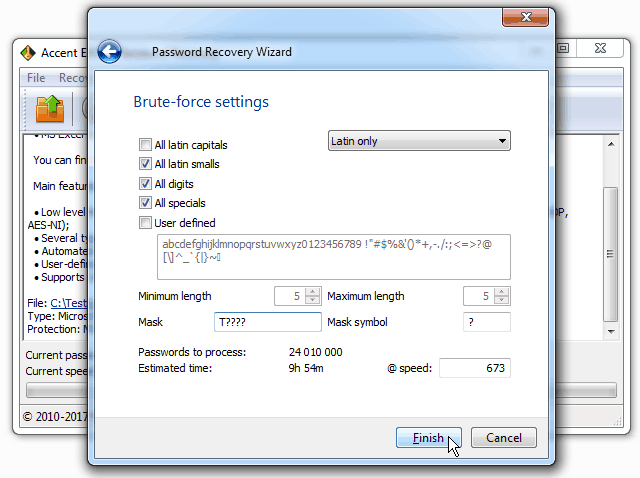
The software lets you define custom character sets for each position in the password — for example, digits at the beginning and specific letters at the end. This greatly reduces the number of combinations and speeds up recovery.
You recover passwords faster — thanks to precise brute-force configuration for each case
Maximum Performance
AccentEPR is optimized for modern Intel and AMD processors, ensuring full-speed operation and efficient use of your PC’s resources.
You save time and get results as fast as possible
If you're dealing with a lost password in a Microsoft Excel document, trust Accent EXCEL Password Recovery to handle it. You’ll be using one of the most effective tools on the market today.
With an Accent EXCEL Password Recovery license you get:
Unrestricted access to all features
Free updates for one year
Free technical support
Payment is available via various online and offline methods. The full list of options depends on the region and is available on
the order page. All transactions related to license purchases for software are secure and strictly confidential.
Accent OFFICE Password Recovery offers even more features and faster speeds.
It provides full support for Microsoft Excel, PowerPoint, Word, Access,
and OpenOffice/LibreOffice. Plus, enjoy major speed boosts with GPU acceleration on NVIDIA, AMD, and Intel Arc
graphics cards.
The demo version gives you access to all features of the program:
Supports Microsoft Excel 6/95–2003, Excel 2007–2013, and Microsoft Excel 2024 / Microsoft 365
Handles multiple types of passwords:
Document open password (choose from three attack types to unlock it);
Modification password (instantly removed);
Worksheet and workbook protection (instantly removed);
VBA project password (instantly removed);
Recovery engine includes highly optimized assembly code tailored to Intel and AMD CPUs;
Offers three attack types:
Brute-force attack;
Mask-based attack;
Dictionary attack;
Includes automatic recovery mode based on preconfigured scenarios;
Allows custom password mutation rules for dictionary attacks;
Easy-to-use and beginner-friendly graphical interface;
High-quality SecurityApplication starting at 1500 RUB,
if you buy a Home License
Compatible with Windows 11/10 and earlier versions, down to Windows XP.
We recommend Accent OFFICE Password Recovery — a more versatile tool with full support for Microsoft Office 95–2024, OpenOffice, LibreOffice, and GPU acceleration on NVIDIA, AMD, and Intel Arc graphics cards.
How to Recover an Excel Password in 5 Steps: A Complete Guide
Even if you’ve never used password recovery software before, this guide will walk you from download to results.
1
Identify the Type of Password in Your File
Before you start, it’s important to understand what you’re dealing with:
Try opening the Excel file
If it won’t open and asks for a password → it has a Password to Open
If it opens in “Read-Only” mode → it has a Password to Modify
If it opens but the cells are locked → it has Worksheet Protection
If you can’t open the VBA editor (Alt+F11) → it has a VBA Password
💡 Summary: Passwords to modify, worksheet protection, and VBA passwords are removed or recovered instantly by AccentEPR. Passwords to open require actual recovery time.
2
Download and Install Accent EXCEL Password Recovery
⚠️ Important: The demo shows only the first 2 characters of the found password and limits the search to 30 minutes. A license is required for full access.
3
Start the Recovery Process
Click “Open” and select your protected Excel file
The program will automatically detect the protection type
If it’s simple protection (worksheets/VBA/modify) — the password is recovered instantly or the protection is removed immediately
If it’s a password to open — choose the attack type (or keep it automatic)
4
Choose the Best Attack Method for a Password to Open
AccentEPR includes an automatic scenario that will run an optimized strategy depending on the Excel version.
But if you want full control:
Choosing automatic or one of the three configurable password attacks in AccentEPR
Brute Force (full search), optionally with a simple mask
Use when: The password is short (up to 6–8 characters), or you know the exact length, character set, or part of the password.
Settings:
Password length: from–to
Character set: digits / lowercase / uppercase / special symbols; national alphabets
Simple mask: brute-force only the unknown positions
Simple mask example:
Anna???? — password starts with “Anna” followed by 4 unknown characters
Example: A 6-digit password → found in seconds
Mask Attack with Position Rules
Use when: You know the password structure and which character types appear in each position.
Mask examples:
?c?s?s?d — uppercase, two lowercase letters, and a digit (?c = uppercase, ?s = lowercase, ?d = digit)
Important: A good mask can reduce the search by thousands or millions of times!
Dictionary Attack
Use when: The password is a word or a combination of words.
AccentEPR dictionary capabilities:
Supports Unicode, UTF‑8, and ANSI dictionaries (passwords in any language)
Combines up to 4 dictionaries in one attack
Applies rule-based mutations for increased success probability
Mutation benefits: The program automatically tries variations like “password” → “Password”, “p@ssword”, “p@$$w0rd123”. You decide which rules to use
(example of dictionary merging and mutation)
💡 Not sure where to start? Use the Default Scenario — AccentEPR will automatically test the most likely passwords for your document format.
5
Wait For the Password Recovery Result
What you will see on the screen:
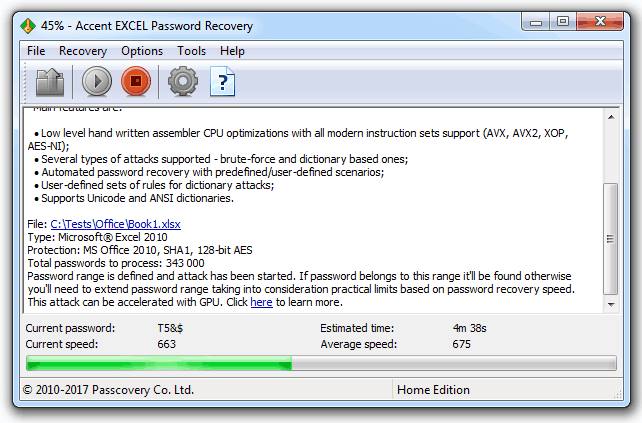
Password search information in AccentEPR
Sample password: Shows how your mask or dictionary combination works
Estimated time: Approximate completion time
Speed (current & average): Passwords checked per second
Progress: Percentage of the total range processed
Found password: Displayed immediately once recovered
⚠️ Can you stop the process? Yes, anytime. The program saves your progress (in the full version), so you can resume later.
6
What to Do After the Password Is Found
The recovered password in AccentEPR — displayed as a clickable link that copies to clipboard
Write down the password — copy it to a secure place (password manager, encrypted file)
Open your Excel file with the recovered password
Save the file without a password (or set a new one you’ll remember)
Create a backup — in case the password is lost again
💡 Expert Tips: Best Practices for the Future
Use a password manager (KeePass, 1Password, Bitwarden) – they help prevent forgotten passwords
Document passwords for corporate files in a secure IT storage
Make backups of important files without passwords on a secure drive
Avoid overly complex passwords for everyday files – better use medium-strength passwords that are recorded or follow a familiar pattern
(dictionary attack with mutations, positional mask)
❓ What if the program can’t find the password?
Possible reasons:
Password is too complex: 6+ random characters may take weeks to brute-force even on a GPU
Wrong attack method: Try a different strategy (e.g., dictionary instead of brute force)
Not enough time: Allow the program more time (complex passwords may require hours or days)
What to do:
Try to recall at least part of the password → use a mask
If it’s an Excel 97–2003 file → use AccessBack.com (password-free decryption, 100% guaranteed)
Contact our support team – we can help optimize settings
User Stories
How a Small Accounting Firm Avoided Losing $8,000 After an Employee Left
Accounting & FinanceResolved in 72 hoursSavings: $7,940
🚨 Situation
The senior accountant of a small firm retired after 35 years, leaving 47 password-protected Excel files containing seven years of client financial history. No documentation for the passwords existed — everything was stored in the employee's memory.
Risks:
Loss of client trust due to delayed access to their data
$8,000+ for professional data recovery services
Weeks of manual work reconstructing data from paper copies
Inability to prepare annual reports on time
💡 Solution
Step 1. Testing: The firm downloaded the free demo of AccentEPR to ensure the program correctly identifies protection types (Excel 2010 .xlsx file passwords) and can start recovery.
Step 2. Dictionary Attacks: After purchasing a license ($60), the IT specialist compiled a list of likely passwords based on known information about the accountant:
Accountant’s names and nicknames, company name, client names
Family members and pets
Local landmarks
Combinations with years (1990–2025)
Professional terms + numbers
Step 3. Mask Attack: When dictionary attacks successfully recovered 12 files, the found passwords revealed a pattern: Word + 2–3 digits. This pattern was applied to the remaining 35 files using a positional mask attack.
✅ Result
47/47files recovered
72 hourstotal time
$60license cost
$7,940savings
Technical details: Passwords 8–10 characters long were recovered on average. The longest process (10-character password) took 3 hours of continuous work on a standard office PC.
Business impact: The firm avoided service interruptions, preserved its reputation, and completed the tax season on time. Automatic recovery allowed the IT specialist to work on other tasks while the program ran.
"We were in panic — we thought we'd lost data for 20+ clients forever. AccentEPR saved our firm: $60 for a license versus $8,000+ for recovery services. And that doesn’t include lost time, unexpected costs, or client risk. The real ROI is definitely much higher."
– Alex S****, IT Specialist at an accounting firm in Melbourne
User Ratings
See what people are saying about Accent EXCEL Password Recovery and
share your own opinion.
Kenneth Klinzing from the United States:"Great product. Saved me 5 hours from rebuilding the spreadsheet. Easy to use. Highly recommend."
Jozef Zoldos from the United States:"Thanks so much. I reviewed some of the guides and was able to do a "user defined" password search. The software was able to generate a password that worked!!!! Thanks so much. I tried other products prior to using Passcovery but they were significantly slower."
an Anonymous Customer from the Canada:"This is a very good software. I can recover my password in about 2 hours."
Mike Chalbyshev from the Russia:"It's a good product. It all depends on how powerful your rig is. Mine has a Xeon, and it was giving me 2.7 million selections per second. I could open WHATEVER I wanted."
an Anonymous Customer from the India:"Password recovery tool working nice and it is very useful. Thanks & Regards"
David Stojakovich (Hoeganaes Corporation) from the United States:"Accent Password Recovery for Excel truly works. I made an xlsm file as part of a work flow in SharePoint in July and for some reason I did not use my routine password. Now in October I went back to modify the file and realize I had totally forgotten what password I created. Thanks Passcovery your program saved my day!"
Julia Afanasyev from the Russia:"Thank you, the program helped me."
Narcis Castillo from the USA:“Excellent performance!”
Yusuf Peoples from the USA:“Accent Password recovery is awesome! My position was eliminated due to budget cuts, and I was laid off last week. I recently was asked to submit a copy of my resume asap, and I could not remember the password to access my resumes. With the use of this software I was able to recover my password protected document within seconds! I am 100 % satisfied with this product and recommend it.”
Aaron Cash from the USA:“This program took less than 20 seconds to recover the sheet password. Thank you. You saved me many hours.”
Randell Canady:“The new version of AccentEPR ran just fine on Windows 7. It was a long process, but it did recover the password that was set to open the file. I would recommend this software for anyone that needs an excel file password recovered. But a warning of the time should be made up front.”
Edward Torres from the USA:“Thank you for helping me with my password issue with my 2010 Excel. It saved me many HOURS of recreating my work.”
Pieter Swart from the Zuid-Afrika:“The best Excel password recovery software I evaluated. Super fast compared to other programs available and easy to use.”
Martin Nappert from the France:“Great job guys, this worked and I recovered the lost password on my xlsx document. Case closed.”
Rune Stenvall from the Sweden:“Excellent, reliable and fast. I can recommend this Product to everyone.”
Remove passwords for Excel 97-2003
Delete passwords to open Microsoft Excel files with AccessBack.com.
AccessBack.com is an online service offering guaranteed removal of passwords from any files created in Microsoft Excel 97-2003 (files ending in .xls/.xla with 40-bit encryption).
The service uses rainbow table technology to run through encryption keys at light speed, decrypt the document and remove the password.
Results are guaranteed, regardless of how long or complex the original password.
* While processing time depends on demand, we promise results in less than 24 hours from the time you upload your file.
Frequently Asked Questions about Accent EXCEL Password Recovery
Short answer: Sheet, workbook, and VBA protection are removed instantly (less than a second). Opening passwords take anywhere from a few minutes to several days, depending on Excel version and password complexity.
Recovery time depends entirely on the password type. Here's what to expect:
Symptom
Password Type
Solution
Estimated Time
File does not open and requests a password
Opening password
Recovery using brute-force attacks (guessing)
Minutes to days*
Opens as "Read-only"
Modification password
Instant removal
Less than a second
Cells are locked for editing
Sheet/Workbook protection
Instant recovery/removal
Less than a second
VBA editor blocked (Alt+F11)
VBA password
Instant recovery/removal
Less than a second
* Depends on Excel version, password complexity, and computer performance.
Excel 2–97 (French Edition): instant recovery. Excel 97–2003: minutes to hours (password-free recovery possible).
Excel 2007–2024: minutes to days for short passwords or when manipulating the search range
(GPU acceleration possible).
Manipulating the search range when part of the password is known (positional mask attack, dictionary mutations)
significantly reduces recovery time compared to full brute-force attacks.
Short answer: Excel 97–2003 uses weak RC4 encryption (fast to crack), while Excel 2007–2024 uses modern AES with deliberate slowdown, requiring more time or GPU acceleration.
Encryption methods differ significantly:
Excel 97–2003 (.xls): uses 40-bit RC4 encryption. Modern CPUs can test millions of combinations per second, making recovery much faster. Also, the file can be
decrypted without a password.
Excel 2007–2024 (.xlsx): uses AES-128 or AES-256 (from Excel 2013) with PBKDF2 key derivation. Each password check is intentionally slowed (50k–100k hash iterations) to prevent brute force. You can
enable GPU acceleration.
For instant removal of simple protection (sheet/workbook/VBA), both versions behave the same. The difference matters only for opening passwords: new files with the same password complexity take significantly longer to recover.
Short answer: Yes. Sheet, workbook, and VBA protection are removed in seconds. Opening passwords are recovered via brute force — success depends on password complexity and dictionary attacks using corporate templates.
This is a common scenario with clear solutions.
Instant scenarios: if the file is protected only at the sheet, workbook, or VBA level (not opening password), AccentEPR removes protection in seconds.
Document passwords: recovery depends on Excel format and password complexity. Many work passwords follow predictable templates (names, dates, corporate terms) efficiently handled via positional mask and dictionary attacks.
Practical tip: first try known employee passwords — people often reuse the same data across systems. If unavailable, try automatic mode — it checks common password patterns before resorting to full brute-force.
Short answer: Not required for old Excel files (.xls) and simple protection. Critically important for modern Excel files
2007–2024 (.xlsx) — speeds up the search by tens of times.
Not mandatory, but highly recommended for complex modern files (XLSX files Excel 2007 and newer).
CPU only in AccentEPR: efficiently handles simple protection passwords (for changes, sheets, VBA) and “Password to open” for XLS files up to Excel 2007.
Instant removal of such protection works equally on any hardware.
GPU acceleration in Accent OFFICE Password Recovery: searches for passwords to XLSX files Excel 2007–2024 tens of times faster due to parallel processing on
multiple GPU cores. CPU tasks that take two weeks may finish in a few hours with GPU
(video card rating).
Speed of Accent OFFICE Password Recovery for Excel 2007 files
Recommendation: for occasional recovery or old Excel files, CPU is sufficient. For frequent work with strong passwords for XLSX files Excel 2007+,
GPU will significantly reduce search and waiting time.
Short answer: Yes, VBA passwords are removed instantly (less than a second) for all Excel versions. If the document is encrypted
with a password to open, it must be removed first.
Yes — VBA passwords are removed instantly (under a second).
VBA passwords protect macro code, but it’s only a safeguard against accidental changes, not document encryption. AccentEPR’s instant VBA password removal
immediately unlocks it, just like sheet and workbook protection. Works for all Excel versions.
AccentEPR instantly removes the VBA password in a new file
Important: if a password to open the document is set, it must be recovered and removed first to access the encrypted content, including VBA projects.
Short answer: Yes, if it’s your files or you have official permission from the owner. Recovering passwords for someone else’s documents without consent is illegal.
Legal use cases:
Recovering passwords for your own files or documents you have official permission to access is completely legal. Typical scenarios include:
Forgotten passwords for personal spreadsheets and work documents
Corporate files of employees who have left the company (with employer permission)
Inherited or archived documents when the author is unavailable but access rights are confirmed
Recovering access to files as part of an audit or legal procedure
Important: Attempting to bypass protection on files you don’t own or don’t have permission to access may violate laws on unauthorized access to information and data protection.
Disclaimer: Passcovery provides software for legal recovery of access to your own data. Users are fully responsible for complying with laws when using our products. Use Accent EXCEL Password Recovery only for files you own or have permission from the owner.
Short answer: Desktop software processes files locally without uploading to third-party servers, ensures full confidentiality, and allows unlimited recoveries per license.
Key advantages of a local solution:
Security and privacy: AccentEPR keeps and processes your files entirely locally — no upload to external servers, eliminating data leakage risk. Critical for financial reports, client databases, trade secrets, and any sensitive company information.
Control and independence: Online services require uploading encrypted files to a third-party server and trusting their security measures. With desktop software, you maintain full control — files never leave your computer, and processing happens offline on your hardware.
Cost efficiency: Online services usually charge per file or use a subscription model with limits. Desktop tools operate on a license purchase model with unlimited recoveries — economical for regular use.
Performance: Local processing leverages the full power of your CPU and GPU without server load restrictions or queues.
For handling sensitive data or complying with corporate security policies, local processing is the only truly safe and reliable choice.
Quick Info
Latest version: 25.04 April 28, 2025
Overall performance improvements: The core of the program has been updated, resulting in faster lost password recovery.
Size: 8024 Kb
: Windows 11/10 and earlier versions of Windows
Screenshots
Main window
Choosing a Password attack in AccentWPR
Program Settings
Official AccentEPR Icon



 Accent OFFICE Password Recovery offers even more features and faster speeds.
It provides full support for Microsoft Excel, PowerPoint, Word, Access,
and OpenOffice/LibreOffice. Plus, enjoy major speed boosts with GPU acceleration on NVIDIA, AMD, and Intel Arc
graphics cards.
Accent OFFICE Password Recovery offers even more features and faster speeds.
It provides full support for Microsoft Excel, PowerPoint, Word, Access,
and OpenOffice/LibreOffice. Plus, enjoy major speed boosts with GPU acceleration on NVIDIA, AMD, and Intel Arc
graphics cards.


 Windows 11/10 and earlier versions of Windows